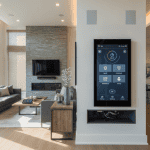
Save up to 30% on energy bills by mastering smart thermostat apps designed for easy control and customizable settings.
Introduction
Picture this: Last summer, my friend Mike was complaining about his soaring energy bills. He had a conventional thermostat, and every time he left for work, he would forget to adjust the temperature. After he installed the Ecobee SmartThermostat with Voice Control, everything changed. Not only did it help him save nearly 30% on his energy costs, but it also allowed him to control the temperature from his smartphone no matter where he was.
If you’ve ever felt like your traditional thermostat is more of a liability than an asset, you’ll want to explore how smart thermostat apps can revolutionize your energy management. They solve the problem of wasted energy by enabling precise control over your heating and cooling schedules. You can adjust settings on the fly, optimize your energy usage, and even receive reminders to change your filters.
What to Consider Before Buying
Before you jump into the world of smart thermostats, it’s essential to consider a few critical specifications. Compatibility is the first thing to evaluate. Many smart thermostats work on common heating systems like gas, electric, or high-velocity systems, but not all of them will mesh with your specific setup. For example, the Nest Learning Thermostat integrates seamlessly with both 2.4GHz and 5GHz Wi-Fi bands, allowing for flexible home network compatibility.
Look for features like remote sensors; for instance, the Ecobee model can support up to 32 remote sensors, ensuring that temperature is evenly distributed throughout your home. If you have a larger space or multiple stories, this detail is crucial.
Energy reports are another aspect to consider. Some models provide monthly consumption summaries, helping you track your energy savings over time. But if you opt for something like the Honeywell Home T9, you also get geofencing, which detects when you’re away from home, adjusting the temperature accordingly.
Don’t overlook the app interface either. Some, like the Ecobee app, have a user-friendly design that allows you to easily set schedules and access performance analytics. Others can be clunky and not intuitive, which can lead to unnecessary frustration.
Three Recommended Products
One thermostat you shouldn’t overlook is the Ecobee SmartThermostat with Voice Control. With support for both Amazon Alexa and Apple HomeKit, it’s incredibly versatile. The pro is its ability to manage humid conditions effectively with humidity-sensing technology. However, one drawback is that it can be a bit costly compared to more basic models, so it might not fit everyone’s budget.
Next up is the Nest Learning Thermostat—an industry classic. Its adaptive learning capability means it can build a schedule based on your habits, significantly reducing manual adjustments. It also provides extensive integration with Google Home. On the downside, the inability to use it without a C-wire might limit its installation for some older homes.
If you’re looking at a more budget-friendly option, the Honeywell Home T5 is worth considering. It’s economical while still offering flexible scheduling, a geofencing feature, and compatibility with both Alexa and Google Assistant. However, it doesn’t support the same number of remote sensors as the Ecobee, which could be a dealbreaker if you have a larger home.
Installation and Setup
Setting up a smart thermostat isn’t rocket science, but there are specific steps to ensure you do it right. Begin by turning off the power at your circuit breaker to avoid any electrical mishaps. As you remove your old thermostat, make a note of the wiring. Most thermostats use labeled connections such as R, R/W, and Y.
When you install the new unit, follow the color coding; for example, the Ecobee connects to R for power, W for heat, and Y for cooling. A common issue is forgetting to hook up the C-wire, which is necessary for continuous power. If your home lacks a C-wire, many brands offer a power extender kit to remedy this.
Once you’ve physically installed the thermostat, connect it to your home Wi-Fi. Use the app to walk you through the setup, which includes programming your schedule and enabling features like alerts. Make sure to check the app’s settings for battery notifications, filter reminders, and energy reports to optimize your thermostat’s functionality.
Common Mistakes Homeowners Make
One common error is assuming that once the thermostat is installed, no further adjustments are needed. Regular checks on settings—especially during seasonal changes—are essential. Many people forget to update their schedules, which can lead to unnecessary energy consumption.
Another frequent mistake is ignoring alerts. Smart thermostats often provide messages about filter changes or issues with the HVAC system. Ignoring these can lead to inefficient heating and cooling.
Additionally, many users underestimate the importance of location. Placing your thermostat near direct sunlight or vents may skew temperature readings, leading to suboptimal performance. Finally, if you’re integrating it with smart home systems, ensure that all devices are compatible and properly configured for cohesive operation.
FAQ
What is a smart thermostat app?
A smart thermostat app allows you to control your thermostat remotely using a smartphone, enabling you to adjust settings, monitor usage, and receive alerts about your home’s temperature.
Can I install a smart thermostat myself?
Yes, many smart thermostats come with user-friendly instructions that make DIY installation feasible. However, some systems may require a C-wire for power, which could need professional installation if not already available in your home.
Do smart thermostats really save energy?
Absolutely! Smart thermostats can save homeowners up to 30% on energy bills by allowing precise control over heating and cooling, optimizing usage based on your schedule, and adjusting temperatures when the home is unoccupied.
What if my smart thermostat isn’t connecting to Wi-Fi?
Check your router’s settings to ensure it isn’t blocking your thermostat. Restarting the thermostat and your Wi-Fi router can often resolve connectivity issues. If problems persist, consult the manufacturer’s troubleshooting guides.
Closing Recommendation
If you’re tired of high energy bills and want a straightforward solution, investing in a smart thermostat is the way to go. While it might be on the higher end of the cost spectrum, the features, flexibility, and significant long-term savings make it a worthwhile investment. Don’t settle for outdated tech when smarter options are ready to help you efficiently manage your energy at home.