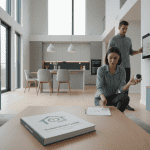
Imagine this: you’re coming home after a long day, and with a single tap on your smartphone, the lights dim, your favorite music starts playing, and the thermostat kicks into comfortable mode. Smart home scenes make scenarios like this possible, creating a relaxing atmosphere tailored to your needs. They save time and energy, transforming your living space into a serene sanctuary as the day winds down.
For anyone looking to enhance their evening routine, understanding smart home scenes is key. This article delves into five specific smart home settings that achieve relaxation. We’ll explore key products, specs to consider, and practical advice for setup that can help avoid common issues. With smart technology, you’ll create an environment that promotes unwinding and comfort.
What to Consider Before Buying Smart Home Devices
When selecting devices to establish your evening relaxation scenes, consider compatibility and ease of use. Make sure your chosen products support popular protocols like Zigbee, Z-Wave, or Matter, as these can improve device communication within your home. For instance, the Philips Hue light bulbs (with a brightness of up to 800 lumens) easily integrate with other smart devices and work smoothly through the Hue Bridge, which connects over Wi-Fi.
Along with connectivity, check the app interface. The better the design, the easier the setup and ongoing use will be. For example, the SmartThings app has clearly laid out menus which make it simple to create and modify scenes. Heated discussions often arise over latency as well. Low latency (under 100ms) is crucial for devices involved in your relaxation scene; high latency can lead to frustrating delays when you try to transition from one scene to another.
Lastly, consider energy consumption. Certain smart plugs or bulbs can be energy-efficient, helping decrease your utility bills while enhancing your home ambiance. The TP-Link Kasa Smart Plug (model KP105) includes energy monitoring features and ranges from $15 to $25, allowing you to track usage through its app.
Three Recommended Products for Evening Relaxation
**1. Philips Hue Smart Light Bulbs**
Philips Hue bulbs are a premier choice for evening relaxation. They offer a range of colors (up to 16 million) and can be dimmed from 1% to 100%, making them perfect for mood settings. The biggest pro for these bulbs is their exceptional compatibility; they work well with all major smart assistants like Alexa and Google Assistant. However, they can be pricier than alternatives, with a starter kit often costing between $50 and $200 depending on the number of bulbs included. If you want an expansive ecosystem that allows for nuanced control over your lighting, Hue is fantastic. But if you’re only after basic functionality, these might be overkill.
**2. Amazon Echo Studio**
For an immersive sound experience while you relax, the Amazon Echo Studio serves as a great choice. With five directional speakers and support for Dolby Audio, this device fills even large rooms with rich sound. The Echo Studio stands out for its built-in Zigbee hub, allowing you to control other smart home devices directly. However, the trade-off is its size; at about 7.8 inches tall, it’s bulkier than other Echo models. Priced around $200, it’s perfect if you crave superior sound and a unified hub but might not fit in smaller spaces like a small apartment.
**3. Nest Learning Thermostat (3rd Gen)**
The Nest Learning Thermostat can adapt to your schedule, ensuring your home is always at the perfect temperature for unwinding. With a 22% energy savings on heating bills, it’s not only about comfort; it also offers financial benefits. The greatest advantage is its self-learning feature, which tunes into your habits over time. However, it’s not the best option for homes without Wi-Fi as it relies on a robust internet connection and its price hovers around $250-$300. If you need advanced learning features and are committed to reducing energy costs, it’s a solid investment. Conversely, if you prefer manual control or have a more limited budget, consider simpler thermostats.
Installation and Setup
Setting up these devices can be a straightforward process if you follow a few key steps. Start by downloading the appropriate apps—Philips Hue app for the bulbs, Alexa or Google Home app for the Echo Studio, and the Nest app for the thermostat.
For instance, with the Philips Hue bulbs, the steps are as follows:
1. Screw in the bulbs and ensure they’re powered on.
2. Open the Hue app and create an account or sign in.
3. Follow the in-app prompts to discover and connect your bulbs.
A common issue arises during the initial setup of the Hue Bridge; if it’s not connecting properly at first, try resetting your router and ensuring that the Bridge is within 10 feet of the router. Ensure your Wi-Fi is running on a 2.4GHz band for optimal performance, as the Hue Bridge may not connect well at 5GHz.
Similarly, when setting up the Nest Thermostat, make sure your existing wiring is compatible. A common difficulty is a missing C-wire; without it, your thermostat won’t receive adequate power. If you run into this, consider using a 24V adapter to supply power.
Common Mistakes Homeowners Make
One frequent mistake is not properly researching device compatibility before purchase. For instance, adding Philips Hue lights to an existing Wi-Fi setup without the necessary Hue Bridge can lead to frustration. Always double-check protocol compatibility, especially if you want to integrate devices from various brands.
Another common pitfall is underestimating the layout of your smart devices. If your smart plug is too far from your Wi-Fi access point, the signal may weaken, leading to unreliable connections. This is crucial with devices that require live control, like smart lighting or speakers.
Lastly, homeowners often overlook setting up automation features properly. For instance, not creating a “Relaxation” scene in your app means you will have to manually adjust each device rather than enjoying a one-touch experience. A little time spent configuring these scenes can save you from daily efficiency headaches.
FAQ
What are smart home scenes?
Smart home scenes are pre-programmed settings that allow you to control multiple smart devices simultaneously with a single command. For example, all the lights can dim, the thermostat can adjust, and music can play for a relaxing evening atmosphere.
Can I create custom scenes with my smart devices?
Yes, most smart device apps, like the Philips Hue or SmartThings app, allow you to create custom scenes. You can choose settings like brightness, color, and device on-off states tailored to fit your relaxation preferences.
Do smart devices work with all home Wi-Fi networks?
Most smart devices operate over 2.4GHz and 5GHz Wi-Fi networks; however, older or incompatible devices may require special settings. Always consult product specifications to ensure compatibility with your home’s network.
How do I troubleshoot connectivity issues with my smart home devices?
Start by checking your Wi-Fi signal strength at the device’s location. If it’s weak, consider relocating your router or devices closer together. Next, try resetting the device according to the manufacturer’s instructions and reconnect it to the app.
Closing Recommendation
Investing in smart home scenes tailored for relaxing evenings can significantly enhance your quality of life at home. With products like the Philips Hue lights for atmosphere, the Echo Studio for sound, and the Nest Thermostat for comfort, you’re equipped to create an oasis of tranquility. Just remember: simple automations can make all the difference, so take the time to create scenes that work for you. Take the leap into smart technology, and you’ll quickly find your evenings transforming into the peaceful retreat you deserve.